
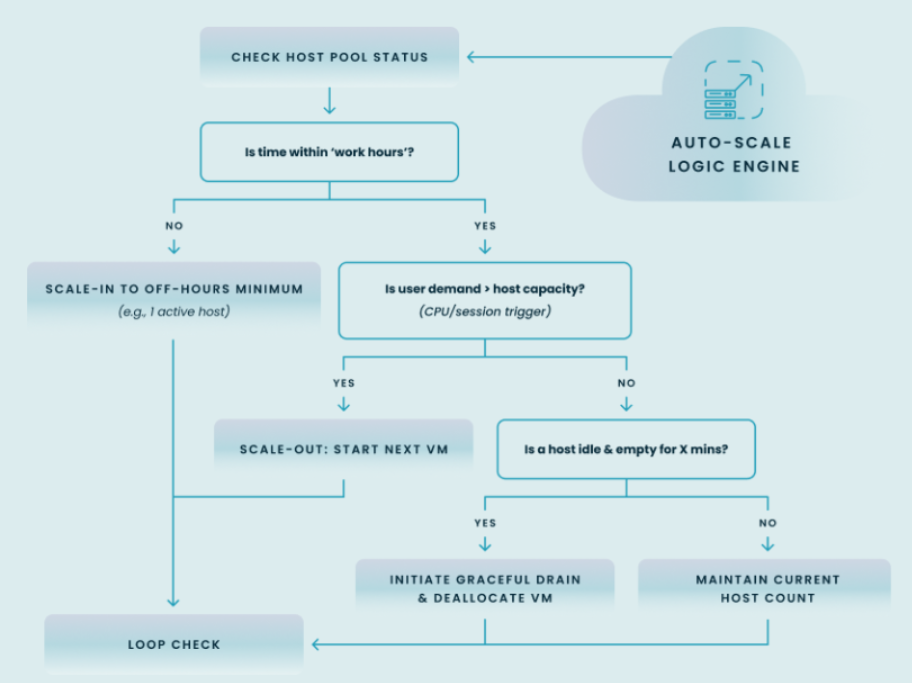
Auto-scaling technology intelligently adjusts your cloud resources in real-time, dramatically reducing costs by eliminating waste while ensuring flawless performance for your end-users. This flowchart shows how a sophisticated auto-scaling process works by combining schedules with real-time demand and efficiently managing idle resources.
Why is auto-scaling essential for managing modern virtual desktop environments?
Managing virtual desktop environments in the public cloud presents a constant balancing act between controlling costs and delivering an optimal user experience. This section explores the critical business and technical challenges that make intelligent automation, or auto-scaling, an absolute necessity for modern IT.
How does dynamic scaling control public cloud operational costs?
When you use Azure for your virtual desktops, you operate on a pay-as-you-go model where you are billed for compute resources by the minute or hour. Without automation, session host virtual machines often run 24/7, even when no one is using them—during nights, weekends, or holidays. This wasted compute can account for over 55% of your total Azure infrastructure spend, which is why auto-scaling is so important.
Nerdio auto-scaling provides a “just-in-time” resource allocation model. It uses a multi-faceted algorithm based on RAM, CPU, user behavior and storage components to intelligently scale up and down resources to control Azure compute cost without impacting user experience. In this way, Nerdio automatically powers down unused session hosts and powers them back on only when user demand requires it, ensuring you only pay for the compute resources you actually consume.
How does auto-scaling improve the end-user experience?
There is nothing more frustrating for a user than trying to log in to their virtual desktop only to find it slow, unresponsive, or completely unavailable. This poor experience is often the result of under-provisioning—not having enough session hosts active to handle the login storm at the beginning of the workday.
An effective auto-scaling strategy eliminates this problem. Nerdio can “pre-stage” hosts, powering them on minutes before users are expected to arrive. This ensures that when your team starts their day, their virtual desktops are ready and waiting, providing a seamless and productive login experience.
What are the challenges of managing virtual desktop resources without advanced automation?
Attempting to manage a dynamic virtual desktop environment manually or with basic scripts is inefficient and ineffective. This approach is defined by several key challenges:
- Reactive Management: IT teams must constantly monitor utilization and react to performance issues, rather than proactively preventing them.
- Human Error: Manual changes to the environment can lead to mistakes, such as shutting down the wrong host pool or failing to provision enough capacity.
- Inflexibility: Simple on/off timers cannot adapt to real-world usage. They fail to account for users who work late, unexpected spikes in demand, or staggered work schedules across different time zones.
How does Nerdio’s auto-scaling technology work for Azure Virtual Desktop?
Nerdio’s approach to auto-scaling goes far beyond simple timers, using a sophisticated, multi-trigger system to make intelligent decisions based on real-time data. Let’s break down the specific technologies that power this automation for your Azure Virtual Desktop (AVD) environment.
What are the key auto-scaling triggers Nerdio uses for AVD host pools?
Nerdio allows you to create highly granular auto-scale policies using a combination of triggers, ensuring resources scale based on the actual user workload. These triggers include:
- CPU Usage: Scale out when average host pool CPU utilization exceeds a defined threshold (e.g., 85%).
- Memory (RAM) Usage: Provision new hosts when available memory becomes scarce.
- Active Sessions: Add capacity when the number of concurrent user sessions surpasses a set limit.
- Available Sessions: Proactively scale out to maintain a buffer of available sessions, ensuring users never have to wait for a desktop to become available.
- Time-Based Schedules: Define core work hours to establish a baseline number of hosts, which can then be dynamically scaled up or down by the other triggers.
How does Nerdio differentiate between scale-out and scale-in logic?
True optimization requires intelligent logic for both provisioning and de-provisioning resources.
- Scale-Out: Nerdio intelligently powers on or creates new session hosts to meet rising demand. Its “pre-staging” capability allows you to start scaling out before peak hours begin, ensuring capacity is ready ahead of user login storms.
- Scale-In: When demand subsides, Nerdio begins a graceful scale-in process. It identifies the least-utilized hosts, places them in a “drain” mode to prevent new logins, and waits for active users to log off before shutting the host down. This process ensures no user work is interrupted and allows Nerdio to aggressively scale down resources—even to zero hosts—for maximum cost savings.
How does Nerdio handle scaling for different AVD session host types?
Nerdio provides tailored scaling logic for the different ways you deploy Azure Virtual Desktop.
- Pooled Hosts: For multi-session environments, Nerdio’s auto-scaling dynamically adjusts the number of active hosts in the pool based on the collective user load, ensuring optimal resource utilization and cost-efficiency.
- Personal Hosts: For persistent desktops assigned to individual users, Nerdio auto-scaling can be configured to automatically start a user’s desktop when they attempt to connect and shut it down after a defined period of inactivity, saving costs without impacting the user’s personal environment.
How does Nerdio enhance management and scaling for Windows 365 Cloud PCs?
While Windows 365 offers a persistent, 1-to-1 desktop experience, significant opportunities for optimization and enhanced management still exist. Nerdio provides specific automation and management capabilities to help you control costs and ensure performance for your entire Cloud PC fleet.
How does Nerdio simplify right-sizing and performance monitoring for Cloud PCs?
One of the biggest challenges with persistent desktops is assigning the correct amount of resources from the start without overspending. This is especially critical given a key platform constraint: a Windows 365 Cloud PC can be upgraded to a larger size, but it cannot be downgraded to a smaller one. The most cost-effective strategy, therefore, is to provision users with a conservative baseline and upgrade them only when their workload demands it.
Nerdio is the essential tool for executing this strategy effectively. It provides detailed performance and utilization reports that give you clear, data-driven insight into which Cloud PCs are under-provisioned and hitting their performance limits. Armed with this data, you can use Nerdio to automate the resizing (upgrading) of specific Cloud PCs, ensuring users get the performance they need, precisely when they need it.
This approach allows you to confidently start small, avoid initial overspending, and ensure you only pay for more powerful resources when a user’s actual workload justifies the cost.
What advantages does Nerdio auto-scaling offer over native Azure scaling plans?
While Microsoft provides native tools for scaling, they are designed as a foundational feature set. Nerdio builds upon this foundation to offer a level of granular control, cost optimization, and simplified management tailored for demanding enterprise environments.
What level of granular control does Nerdio provide that native tools lack?
The primary difference lies in the sophistication and flexibility of the scaling engine. Native Azure tools are effective for basic, schedule-based scaling, but Nerdio provides deeper, workload-aware control.
| Native Azure Scaling Plans | Nerdio Manager Auto-Scaling | |
|---|---|---|
| Primary Triggers | Schedule, Number of Sessions | Available Session Buffer, Schedule, Sessions, CPU, RAM, and Storage algorithm |
| Scale-In Logic | Basic host shutdown | Graceful session draining (Rolling Drain Mode), customizable delays, and aggressiveness tuning (Medium to High) |
| Scale to Zero | Not available in all configurations | Standard feature to shut down all hosts |
| Session Fragmentation | Limited handling | Actively consolidates users onto fewer hosts |
| Management | Requires navigation of Azure portal blades | Unified, single-pane-of-glass interface. Advanced Autoscale analytics with historical logs and interactive graphing |
| Artificial Intelligence | Predictive ML modeling via Azure Monitor | AI analysis and recommendations for optimal session host sizing, configuration recommendations, etc. |
How does Nerdio’s cost-saving algorithm achieve deeper savings?
Nerdio’s algorithm is purpose-built to maximize your Azure savings. It can aggressively scale a host pool down to zero active hosts, a feature that provides immense savings during off-hours. Furthermore, it intelligently manages “session fragmentation” by consolidating users from multiple, partially-filled hosts onto a single host before shutting down the now-empty ones. Finally, Nerdio provides built-in financial reporting that tracks your historical Azure spend and quantifies the exact savings generated by auto-scaling, providing clear proof of its ROI. Penn State University harnessed Nerdio Manager’s intelligent auto-scaling to master Azure Virtual Desktop costs for its 1,000+ remote learners. This shift from manual scripts to automated resource management delivered a significant 71% reduction in their Azure compute spend, ensuring efficient budget use.
How does Nerdio simplify the management and reporting of auto-scaling?
Managing virtual desktops should not require you to be an Azure expert. Nerdio replaces the complexity of navigating multiple Azure portal blades with a single, intuitive management interface. From this single pane of glass, you can create, manage, and monitor all your auto-scale policies, view historical scaling actions, and access detailed performance and cost reports, dramatically reducing administrative overhead.
Key takeaway:
The central takeaway is that intelligent automation is the key to unlocking the full financial and operational potential of AVD and Windows 365. While native cloud tools provide a basic foundation, Nerdio Manager for Enterprise delivers event-driven, cost-aware automation that transforms auto-scaling from a simple utility into a strategic asset for financial governance, operational efficiency, and a superior user experience. For any enterprise serious about optimizing its total cost of ownership and delivering reliable performance in its virtual desktop environment, Nerdio’s advanced auto-scaling represents the industry standard for excellence.
How to start optimizing your Azure Virtual Desktop costs:
The best first step is a strategic conversation. Discuss with your Choice Solutions representative how you can use an automation platform to implement a right-sizing strategy tailored to your unique needs and user work patterns.